
A guest packs up after a great long weekend, waves on the way out, and drives home. Somewhere in their head is the exact feedback you'd want - the site that was perfect, the amenities block that needed attention, whether they'd recommend you to a friend. By the time you think to ask, they're three hundred kilometres away and the moment has passed.
Surveys are how you catch that feedback while it's still fresh, and turn it into something you can act on. They live right inside Camper BMS, next to your bookings and guests, so building a survey, sending it, and reading the results all happen in one place. No separate survey tool, no extra subscription, no exporting lists to bridge the gap.
Here's how it works.
Feedback That Lives Where Your Bookings Do
The whole point of building surveys in is that the feedback lands next to the guest it came from. Your surveys sit alongside your bookings and guest records, behind the same login you already use, so there's nothing extra to manage and nothing extra to pay for.
That proximity is what makes the feedback useful rather than just collected. You can track your Net Promoter Score, watch how ratings move over time, and read what guests wrote after a stay - all without stitching together a spreadsheet and a third-party tool. Once a survey is attached to your automatic post-stay email, it goes out to departing guests in line with your notification settings. As the sender, you stay responsible for honouring your guests' communication preferences.
Build Surveys Your Way
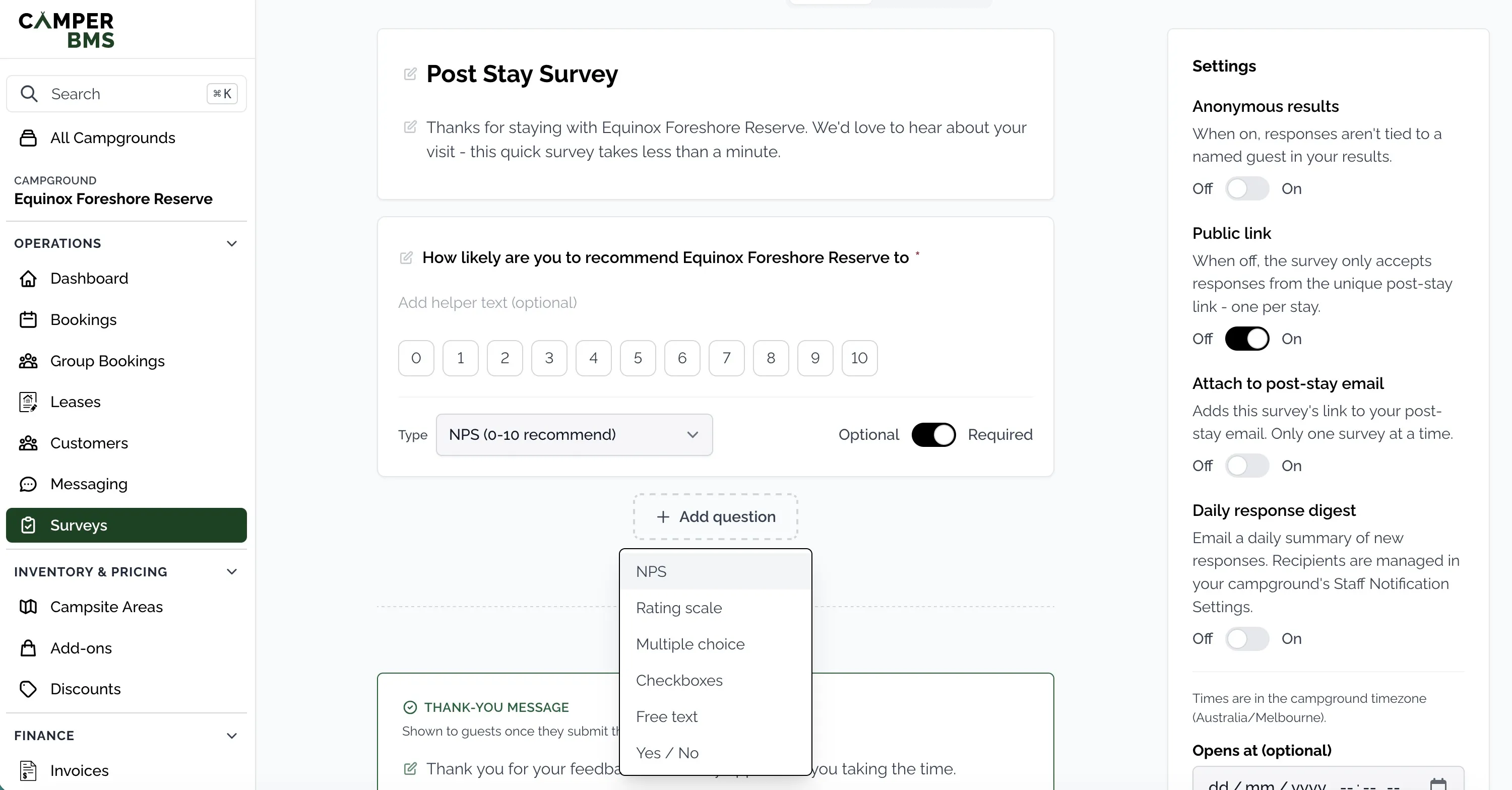
The survey builder is visual. You edit the survey the way it will actually look to a guest - add a question, drag to reorder, tweak the wording inline - so there's no gap between the form you're building and the form they'll see. Flip to Preview at any point to check exactly what lands in front of them.
You get every question type a stay survey tends to need:
- Net Promoter Score - the classic 0-10 "how likely are you to recommend us".
- Star or number ratings for cleanliness, facilities, value, or anything else worth scoring.
- Multiple choice when you want one answer from a set.
- Checkboxes when guests can pick as many as apply.
- Yes / No for the quick, unambiguous questions.
- Free-text comments for everything you didn't think to ask.
To save you starting from a blank page, new surveys open with a ready-to-go NPS question plus friendly intro and thank-you text already written, so a usable survey is only a few edits away.
Share It However Suits You
A survey is only as good as your ability to get it in front of guests, so there are a few ways to share it and you can use whichever fits.
- A hosted link. Every survey gets its own shareable web page, ready to drop into an email, a text, or a social post.
- A website widget. Embed a survey straight into your own site with a copy-paste snippet - the same way our booking widgets work - and responses flow back to Camper BMS automatically.
- Your post-stay email. Mark a survey as post-stay, then add it to your post-stay email template - two settings, and from then on it goes out automatically with no copying links around each time.
If you'd rather only hear from people who actually stayed, you can switch off the public link and collect responses solely through the unique, per-stay link in the post-stay email. That gives you one response per stay, tied to a real booking.
Feedback Guests Are Happy to Give
The more comfortable a guest feels, the more honest their answers, so you have a few controls that shape how a survey reaches them.
Decide whether responses are tied to a guest or kept anonymous - guests can see which it is, so they answer with confidence either way. Want a survey to run only over a busy long weekend, or to close once you've heard enough? Set open and close dates in your campground's time zone and it starts and stops on its own. And every survey stays focused on a single, simple ask: how was your stay - which is exactly the kind of question guests are happy to answer.
See the Results at a Glance
Responses feed a live results dashboard, so you're never waiting on a report or exporting raw data to make sense of it. Headline stats sit up top - total responses, your NPS score, average ratings - with a clean breakdown of every question underneath.
It's built to be readable at a glance: the NPS promoter and detractor split, rating distributions, choice breakdowns, and a plain list of written comments. For identified surveys, you can browse individual responses with the guest's details attached, so feedback connects back to the stay it came from.
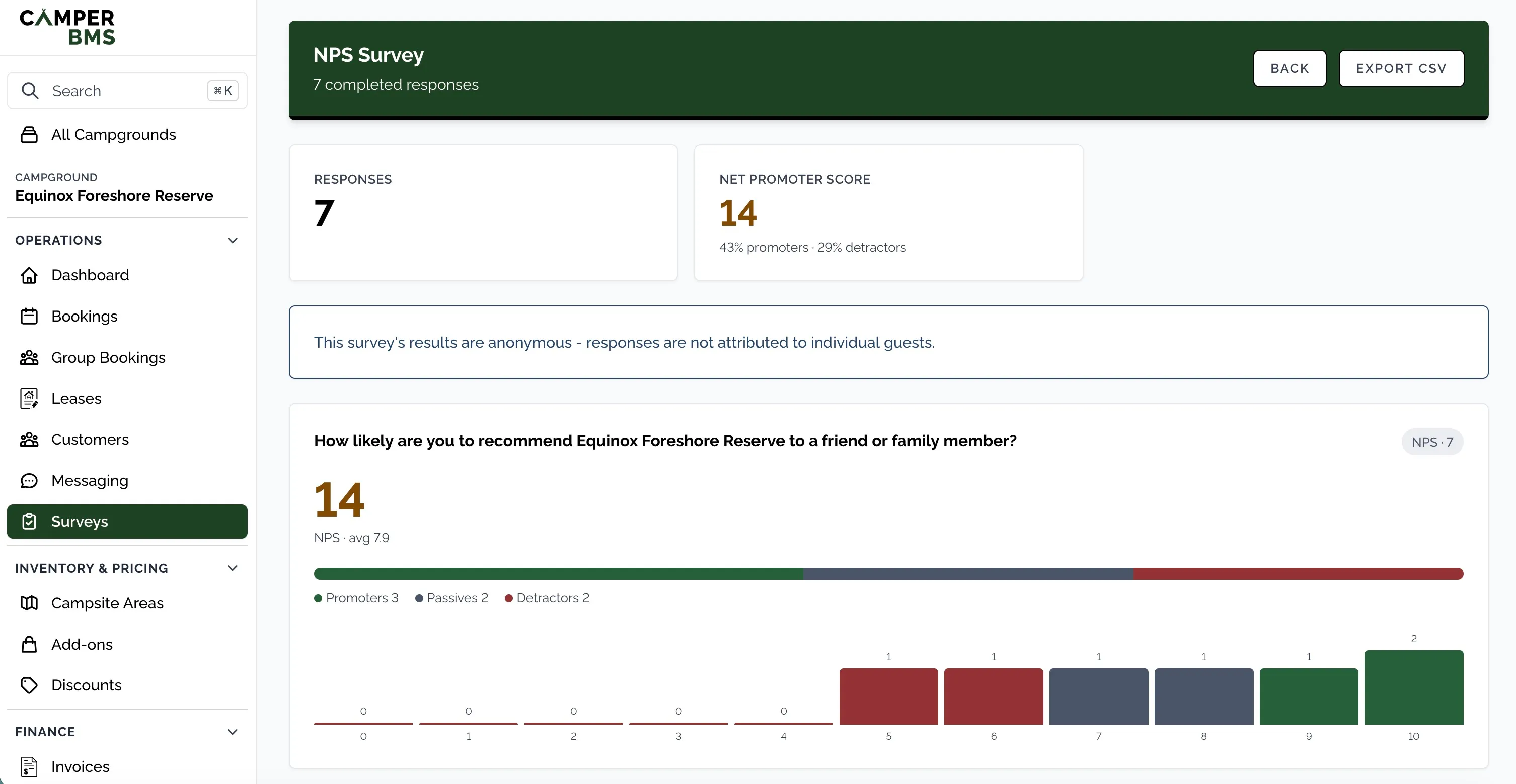
When you want the raw numbers, export everything to CSV and pull it into a spreadsheet. And to keep feedback in front of you without checking the dashboard, a daily digest emails a summary of new responses to whoever you nominate in your notification settings.
Start With One Question
You don't have to design the perfect survey on day one. Open a new survey, keep the ready-made NPS question, attach it to your post-stay email, and you're collecting feedback by the next checkout. From there you can add a rating or two, turn on a few more questions, and let the results dashboard show you where to look next. Each piece works on its own, and they build up as you go.
Turn guest feedback into something you can act on
Guest feedback surveys are built into Camper BMS - no separate subscription required. Attach one to your automatic post-stay email and feedback lands next to the booking it came from, ready to act on before it shows up as a public review.